50 group photo ideas for teams, with poses for every size
Poses for 5 to 50+ people, fun shots, themed and remote team photos. Plus how to take a good group photo with a phone and a checklist for a headshot day.

Most team photos look the same: one long row, squinting into the sun, someone cut off at the edge. These 50 group photo ideas fix that for work teams, with poses sorted by group size, funny and candid photo ideas for groups that want more than a lineup, themed shots for the holiday party and the offsite, and ideas for teams that only meet on video.
Below the ideas: eight phone tips that make any group photo better, a checklist for a team photoshoot, and how to handle consent before anything gets posted.
Group photo poses by group size
The right pose depends on the headcount. These four sizes cover most teams; pick the closest and adjust.
Small teams of about 5
- Two and three: Two in front, three behind, everyone's shoulders angled slightly toward the middle.
- Sit and stand: Two people on a bench or the arms of a sofa, three standing just behind them.
- The walk toward: Everyone walks toward the camera in a loose line. Shoot in burst and keep the frame mid-stride.
- Lean on the rail: Everyone leans on a railing or a wall at slightly different angles, never in a straight row.
Teams of about 10
- Two staggered rows: Back row stands in the gaps between front-row heads, so every face has its own window.
- The V: One person at the front point, the rest fanning back on both sides like a flight of geese.
- Staircase spread: One or two people per step on a wide staircase, shot from the bottom at chest height.
- Around the table: Seated around a meeting table, with the camera at one end raised a little above head height.
Groups of about 25
- Three-tier rows: A row in chairs, a row standing, and a back row on a sturdy bench or a step.
- The shallow arc: A gentle curve so the people at the ends are as close to the camera as the middle.
- Front door steps: Everyone on the entrance steps, with the company sign above them in the frame.
- Team clusters: Small groups of four or five spread across the frame, each team in its own loose huddle.
Groups of 50 or more
- The overhead: Shoot from a balcony or a second-floor window while everyone looks up and waves.
- Make a shape: From above, the team forms the company's first letter or an anniversary number.
- Bleacher rows: Outdoor steps, an amphitheater or venue seating does the tiering for you.
- The big cheer: Hands up on a count of three, shot in burst from a raised spot so the back rows show.
Fun and candid group picture ideas
Take the posed shot first, then one of these. The fun one is usually the photo people keep.
- The jump shot: Everyone jumps on three (arms up counts). Burst mode, then pick the frame with the most energy.
- Mid-laugh: The photographer says something silly and shoots the laugh, not the smile before it.
- All eyes on one: Everyone looks at one volunteer, who is the only one looking at the camera.
- The turnaround: Everyone starts with their back to the camera and turns on three. Keep both frames.
- Prop basket: A basket of props by the photo spot: everyone grabs one item and holds it up.
- Hands in: Hands stacked in the middle of a huddle, shot from directly above.
- Whiteboard moment: The team at a whiteboard mid-brainstorm, laughing at something on the board.
- Mug raise: Everyone raises a coffee mug toward the camera at the same moment.
- Shoe circle: Everyone's feet in a circle, shot from above. Good for people who'd rather not show their face.
- Hallway strut: A slow walk down a hallway toward the camera, like the poster for a heist film.
- Motto sign: The team holds up its motto, one word per person, on sheets of printer paper.
- Then and now: Recreate an old team photo with the same people in the same spots and post both.
Going with the motto sign? Our team mottos are short enough to fit one word per person.
Themed team photo ideas
For the moments a team photo marks: the holiday party, the offsite and the department page.
Holiday party
- Sweater row: Everyone in their holiday sweater, the front row seated so every sweater shows.
- Gift box wall: The team behind a stack of wrapped empty boxes, heads popping up over the top.
- String-light glow: Everyone holds a strand of battery lights, shot indoors with the overhead lights dimmed.
- The year ahead: Four people each hold one digit of the coming year in big paper numbers.
Offsite or retreat
- The view behind: At the best viewpoint, team in the lower third and the landscape filling the rest.
- Long table: Everyone standing behind their chairs at the dinner table before the food arrives.
- Mid-activity: A candid in the middle of the activity: paddles up, brushes out, the game at its loudest.
- Where we flew in from: The team around a big printed map with a pin in every home city.
Department or team page
- Tools of the trade: Each person holds one thing from their job: a headset, a laptop, a measuring tape.
- Down the desk row: Everyone at their desks, turned toward a camera at the end of the row.
- Product in hand: Everyone holding the product the team makes, sells or supports.
- Team color day: The whole department in one color, against a plain wall that doesn't compete.
For the sweater row, our ugly sweater party guide has 30 DIY sweaters, and our office holiday party ideas give you a party worth the photo.
Remote team photo ideas
A remote team can still have a team photo. Most of these take five minutes at the end of a call.
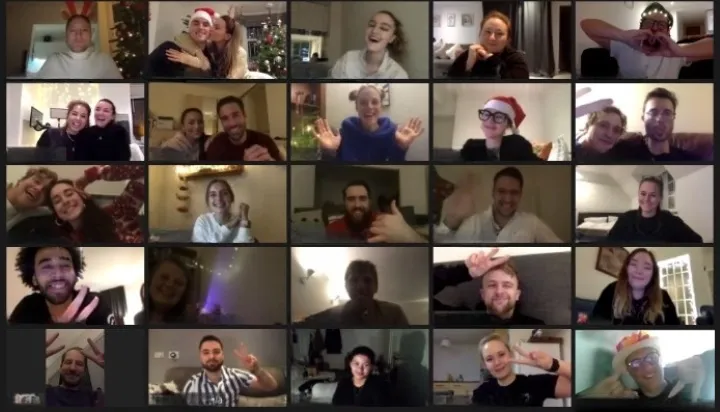
- Gallery view screenshot: Everyone holds the same pose (a wave, a thumbs up) for three seconds while one person screenshots.
- Same-object grid: Everyone holds up the same kind of thing (a mug, a plant, a favorite book), so the grid reads as one picture.
- Pass it along: Each person hands an object out of their square toward the next. Takes three tries, worth it.
- Reach across: Everyone reaches toward the same edge of their square, so the grid looks connected.
- Matching backgrounds: Everyone switches to the same virtual background for one screenshot.
- Home wall composite: Everyone sends a photo against a plain wall at home, and one person arranges them into a single team image.
- Silhouette grid: Everyone sits with a bright window behind them for a grid of silhouettes. Good for the camera-shy.
- Same minute, everywhere: At one agreed minute, everyone photographs what's in front of them. Post them as a grid.
- The screen in the room: For hybrid teams: the office group photo with the remote people on the big screen behind.
- Doodle self-portraits: Everyone draws themselves in two minutes and holds the drawing up to the camera.
How to take a good group photo with a phone
You don't need a photographer for a team photo. You need light, a little height and a burst.
- Face the light. Put the team facing a window or in open shade. Never shoot with a bright window or the sun behind them.
- Raise the camera a little. Hold it slightly above eye level, standing on a step or a sturdy chair. Faces look better and the back row shows.
- Stay at 1x or 2x. The ultra-wide lens stretches the people at the edges of the frame. Step back instead of zooming out.
- Fill the gaps. Each person in the back row stands between two heads in front. If you can't see the camera, it can't see you.
- Use a stand and the timer. A small tripod or a stack of books, with the 10-second timer, puts the photographer in the photo.
- Shoot a burst. Someone always blinks. Take a burst on three and pick the frame where every eye is open.
- Tap to focus on the middle row. On most phones a long press locks focus and exposure, so the camera doesn't refocus on the background.
- Take two orientations. Horizontal for the website and slides, vertical for social posts and the team channel.
Team photoshoot checklist for website and LinkedIn headshots
For the day the whole team gets new headshots and a fresh group photo. Copy it into your project doc and tick it off.
Two weeks before
- Book a room with a window and a plain wall, or rent a backdrop
- Open a sign-up sheet with five-minute headshot slots
- Tell people what to wear: solid colors, no tiny patterns or big logos
- Ask how each person wants their name written on the website
- Tell people what the photos are for, and that they can opt out
Set up on the day
- Camera or phone on a tripod at eye level
- A stool, not a chair with arms
- Window light to one side, or two lamps with white shades
- A mirror, a lint roller, a comb and water
- A marked spot on the floor so every headshot matches
Shots to get
- A chest-up headshot for the website and LinkedIn
- A looser half-body shot for speaker bios
- One candid at a desk or in a meeting
- The full team photo, posed and then a fun one
After
- Let each person pick their favorite headshot
- Crop every headshot to the same size and framing
- Name the files first-last.jpg and share them within a week
- Delete the outtakes nobody chose
Ask before you post: consent and easy opt-outs
A team photo should make everyone in it glad to be there. Six habits keep it that way.
- Say where the photo will go. The team channel, the careers page and a public LinkedIn post are three different asks.
- Make opting out easy. Offer a no-photo lanyard or sticker, or let people step out of the shot without explaining why.
- Ask before tagging. Post the photo, but let each person tag themselves.
- Crop or remove on request. If someone asks to be taken out of a posted photo, do it the same day.
- Take extra care with family events. At a family day, ask a parent before photographing or posting any child.
- Check before reusing old photos. Ask before putting a former teammate, or a years-old photo, on a new page.
Posting to the team channel? Give it a better name than General with our group chat names.
Give the team something worth photographing
The best group photos happen in the middle of something: everyone holding the canvas they just painted, or the winning team mid-cheer. Our in-person games come to your office in 17 US cities, and kit workshops ship to every desk or home (book kits about 3 weeks ahead). Planning a trip? See how we run a company offsite.
Two at your office, two kits by mail, with today’s prices.
Looking for the event itself? Browse our corporate event ideas, or get a free quote with your date and headcount.
